From the BlogSubscribe Now

05/08/25 Capture One, big announcement, at least for portrait photographers

After all the hype, and talk about supporting the photographic community, it appears that the folks at Capture One, do care about certain photographers, (portrait), but have no love for the landscape shooter.

There was a live stream video that was sponsored by C1 today. NOTE, they were very clear about being an independent company, i.e. separate from Phase One. That is BS, as if they were totally separate, their single biggest concern would be GENERATING MORE SUBSCRIPTIONS AND THUS REVENUE. To do this, they need to add support for the Hasselblad, which I guess will never happen. Hasselblad continues to step on themselves with Phocus Desktop and Capture One would be a perfect fit. The folks at Capture One made a point of stating just how dedicated they were to color science, so figuring out how to get HNCS into C1 should not be that damn hard.

As for tools, C1 announced a retouch tool, strictly aimed at portrait photography. Looks nice and uses AI, big surprise, but it is only going to assist studio shooters. In fact all that the video talked about today was tethered work, they must have mentioned tethered shooting at least 25 times. NOT, too many photographers in landscape settings are going to carry around a 4 pound MacBook Pro to tether, and personally I can’t see any advantage to tethering in the field.

Sadly, NO new features were announced for landscape shooter, especially new masking tools, like sky select. Capture One is woefully behind the curve on this. Their current AI brush can’t being to mask a sky. If you are working landscape, by far one of the first things you attempt to finish out is the variance between sky and foreground and without a good Sky Select masking, it takes forever. Also if you are working with exposure bracketing, the current Capture One masking tool does not copy well to other images.

Oh well, time to move on and wait for the next BIG ANNOUNCEMENT.
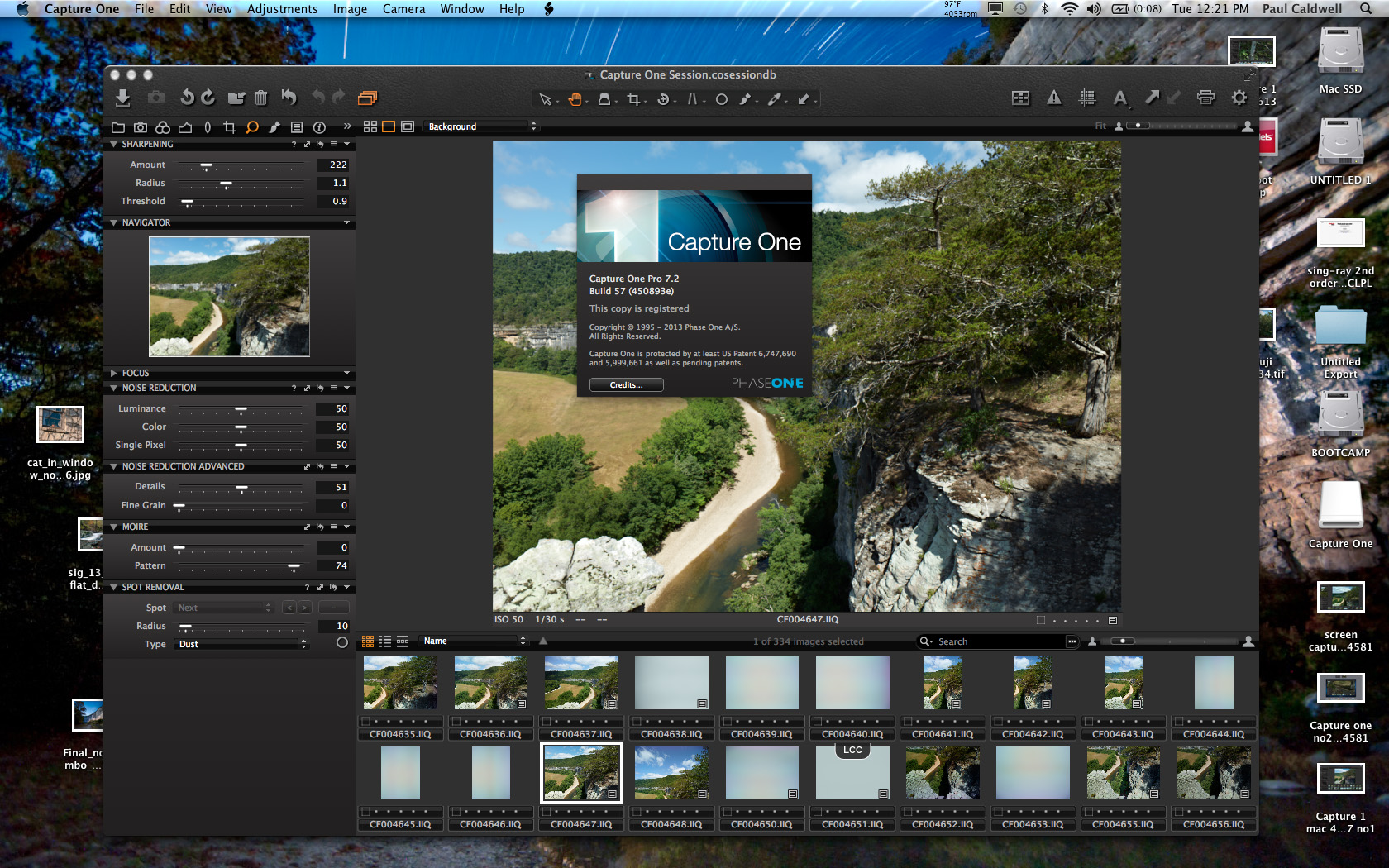
02/05/14 Capture One 7.2 is released to the field

Capture One 7.2 is out

The newest version of Capture One is 7.2

If you are using Capture 7.x, look for the latest version of the software which is 7.2.  Capture One has finally released this newest version to the general population, about 1 week after they announced their latest digital back, the IQ250.  It looks like no new tools were added, sigh!!.  I keep hoping to see the ability to have noise reduction in a local adjustment along with the ability over lapping color adjustment levels that don’t cancel each other out.

Here are the main improvements in 7.2, besides support for the new IQ250 are:

  • Improved live view frame rate on Mac.
  • Improved live view alignment between Mac and Windows.
  • Fixed a number of live view issues.
  • Improved tethered stability on Mac.
  • Fixed some XMP syncing issues.
  • Improved importer performance on Mac.
  • Fixed a stability issue related to collapsing of stacks on Mac.
  • Fixed a stability issue related to reordering jobs in the batch queue on Mac.
  • Fixed some LCC issues.
  • A number of other bug fixes.

In my workflow, I don’t see too many things that make me want to upgrade my main production machine to 7.2.  I am going to check out 7.2 on my MAC and see if any new tool sets were added or if anything else was modified.  Obviously, if you purchase a new IQ250, you will have to have this version as there will be no support in prior versions of Capture One.

From looking over this list, it seems that most of the bug fixes were around Live View, but this must all be about Live View on the PC or MAC while tethered, again not anything that will help me in my outdoor workflow.

However there is mention of “fixed some LCC issues”, I am wondering if this might have fixed an issue I had with 7.16 where somehow my LCC processing was corrupted.

I work in session mode. After I started to working with 7.16 during some processing of IQ260 and IQ280 files a strange issue occurred.  When you process an LCC in Capture One, you process the LCC image, and then Capture One allows you to save the processed LCC as a preset.  Once the LCC is processed, you will see the check boxes of 1, color cast, 2. Dust removal, 3. light falloff selected by default.  I noticed that all of a sudden even though the saved LCC showed these defaults selected, when I applied the LCC to the image, nothing happened.  So the color casts and light falloff that was visible in the image did not change.  I could go back to the saved LCC and all three check boxes were now unchecked, and greyed out.  I could not select anything.

To fix this I tried first to delete the current LCC, and re-create it.  This worked as it should but as soon as I tried to apply the LCC, the check boxes greyed out again.  I closed Capture One and re-opened it which fixed nothing and then I rebooted my PC, and still it was broken.  Not a good deal as all my images are from tech camera.

What was interesting was I could could go to another folder of images and the LCC’s worked like they should.  It only seemed to apply to this one folder of images.  The only thing I had done differently was move some IQ280 raw files into the same folder as my IQ260 raw files as I was working up a comparison.

The only way I could fix the problem was to delete 7.16 from my PC and reinstall 7.15.  Then all thing worked correctly.

Hopefully this fix mentioned in 7.2 addresses this problem.  But I will wait a bit longer to load 7.2 on my production machines.